Most professional services leaders can trace their decision to implement PSA software back to a single moment. Maybe a project ran six weeks over, and nobody saw it coming. Maybe a client asked why their invoice didn't match the scope, and three people gave three different answers. Maybe you asked your ops director for a utilization report, and it took three days to produce — in a spreadsheet, no less.
That moment is usually what starts the PSA software conversation.
By the time you're reading a guide like this, the "should we get a PSA?" question is probably already settled. The harder question — what good implementation actually looks like, what it costs, how long it takes, and where it goes wrong — is what this guide is for.
How Is a PSA Implementation Different from Other Software Rollouts?
PSA implementation stands apart from most software rollouts, not because it's technically harder, but because of its scope. It's the only category of business software that connects delivery performance, resource capacity, and financial health in a single system, which means the gains compound meaningfully when it's done well, and the whole organization feels it.
Most software rollouts are contained. A new CRM reshapes the sales team's workflow. A new accounting tool changes how finance closes the books. A PSA implementation is categorically different: it spans project delivery, resource management, time tracking, billing, and financial reporting simultaneously.
That breadth is the point. A PSA platform enables the entire business to operate from a single source of truth: one place where the whole operation is visible together, updating in real time as work happens.
- Project managers can see the budget impact as hours are logged.
- Resource leads can make intelligent staffing decisions against live (and future) project demand.
- Finance doesn't wait for a monthly reconciliation to understand margin.
The result is a compounding effect that isolated tools can't produce. Better data leads to better decisions, which leads to more predictable delivery, which leads to healthier margins — and that cycle accelerates as the platform matures. It's why PSA software implementation tends to be treated as a strategic initiative rather than a software deployment, and why the returns scale with the investment.
According to IDC research, professional services firms without PSA software in place lose 5-10% of potential revenue annually through administrative drag, billing delays, underutilized talent, and unmanaged scope. At 100 people, recovering even half of that gap is a material outcome.
What distinguishes firms that get there fast from those that spend months in slow adoption is rarely the software they chose. It's how seriously they treated implementation as a business change, with clear ownership, aligned stakeholders, and a vendor with the implementation depth to match their goals.
What Should You Do Before Implementing PSA Software?
Most implementation problems are actually software selection problems. And most selection problems trace back to the same root cause: teams started evaluating vendors before they understood their own operations well enough to know what they needed. Where should you start?
Conduct an operational audit before you talk to a vendor
The single best thing you can do before evaluating PSA software is understand, with some precision, where the gaps are in your operations. As an example:
- What is your current billable utilization rate, by team?
- What percentage of delivered hours are going uninvoiced?
- How long does it take from project completion to invoice sent?
- On your last five projects, what was the variance between estimated and actual margin?
If those numbers require a multi-day spreadsheet exercise to produce, that gap is your baseline. It's also your business case. If you’re unsure where your gaps are, identify your operational inefficiencies with this free assessment.
Define success metrics before the sales process begins
Teams that buy the platform with the best demo often realize, six months later, that they hadn't agreed on what "good" looked like.
Before you talk to a single vendor, write down four or five metrics that will tell you, twelve months from now, whether this was worth it. The ones that tend to matter most for mid-size professional services firms:
- Billable utilization rate — the baseline benchmark and the most sensitive indicator of PSA software impact
- Time-to-invoice — how long from project close to invoice sent
- Project margin variance — estimated vs. actual, at the project level
- Admin hours as a percentage of total hours — one of the most undertracked costs in professional services
- Revenue per employee — the headline number that everything else feeds into
Organizations that establish these benchmarks before go-live have a much cleaner story to tell leadership twelve months later. Firms that don't tend to spend those twelve months arguing about whether the implementation is "working."
Curious about industry benchmarks for professional services? See how your firm compares across 6 sections: delivery performance, billable utilization, EBITDA and profitability, revenue growth, revenue leakage, and talent. Download the report now.
Get the right stakeholders in the room
PSA software implementation is not an IT project. The people who should be shaping requirements are the people who feel the operational pain most acutely: delivery leads who lose hours to status updates, resource managers who plan in spreadsheets, and finance directors who reconcile billing manually.
Involving these people in evaluation, not just rollout, does two things:
- It improves requirements quality
- It creates early champions within the team who take ownership of the outcome.
That second thing is more valuable than most leaders expect.
How to Choose the Right PSA Software for a Professional Services Firm
The PSA software market is crowded, and every platform looks capable in a demo. The leaders who make the best selection decisions are the ones who enter vendor conversations already knowing what they need and don't get distracted by what they're shown. Agency leaders can shorten that work by starting with a shortlist of the best agency management software.
Develop your list of core capabilities
PSA vendors have become very good at looking complete. The feature list on any major platform will cover everything from project templates to profitability forecasting. The question isn't what's on the list; it's whether the platform operates on a single, unified data model or whether those capabilities are modules that communicate through integrations.
The distinction matters enormously in practice. When project delivery, resource planning, time tracking, and billing all pull from the same underlying data, your financials update in real time as work happens. When they're stitched together across separate systems, you're back to reconciliation cycles, just with more expensive software.
The capabilities that are generally non-negotiable for a 50–300 person professional services firm:
- Real-time financial visibility across project costs, billing, and margins
- Automated time tracking that doesn’t consume a lot of time — if logging time takes more than two minutes, your team won't do it consistently.
- Intelligent resource management, based on skills, past performance, project needs, and availability
- Adaptive workflows and project plans, to streamline delivery and ensure project plans and dependencies are aligned even when priorities change
- Embedded AI, including MCP integrations (natural-language queries against your live data) and agentic AI assistants
What to look for in AI features
Practically every PSA platform now leads with AI in its marketing. However, there's a meaningful difference between AI layered on top as a reporting function and AI embedded across the PSA platform's operations, learning from your delivery patterns, flagging risks before they compound, and surfacing actionable recommendations rather than historical summaries.
Questions to ask:
- Does AI learn from operational data and patterns over time, refining recommendations and forecasts?
- Does AI predict project completion dates and budget trajectories based on current performance, or does it just report on where you are?
- Does AI surface early warning signals in resourcing and margin before a project goes off track, or does it show you the damage after?
- Does your platform offer MCP connections with Claude, ChatGPT, Gemini, or Copilot Studio? And what about agentic AI assistants?
- Can you show me an example of the AI flagging a project risk before it became a problem?
Get the complete PSA Software Requirements Checklist with 50+ evaluation criteria
The answers matter more than the demo. Accenture's 2024 research found that AI-powered organizations grow revenue at 2.5 times the rate of their peers. Performance is affected when AI is integrated across the workflow, rather than installed as a feature on top of it.
Understand true cost of implementation
Subscription fees are the smallest number in a PSA software implementation budget. For the wider picture of what a platform costs across the first year and beyond, see what PSA software really costs. The higher costs are the ones that don't show up in a vendor quote: internal team time, data migration and cleanup, the productivity dip around go-live, and ongoing training.
A rough framework for building a complete cost picture:
- Internal time: Who is owning this, and what are they not doing while they are? Most implementations are led by one internal owner at roughly 30% of their capacity over 4–8 weeks — a manageable lift that rarely requires pulling people off client delivery.
- Data preparation: If historical project data is spread across multiple systems and spreadsheets, plan for data cleanup early — it's the phase that catches teams off guard most often, and getting ahead of it compresses the overall timeline.
- Training: One all-hands demo is not training. Role-based training for project managers, resource planners, finance staff, and delivery teams — that's training.
- Vendor implementation support: The quality and depth of this varies dramatically. Ask specifically what's included and what's extra.
These investments are real, and they're typically recovered within the first year. The business case section below shows the math.
Questions to ask:
- What does your standard implementation timeline look like for a company our size, and what are the most common reasons it extends?
- What implementation support is included?
- How do you handle data migration from our current tools?
- What does your onboarding process look like for end users, not just administrators?
- What does your customer support model look like after go-live?
- Can you connect us with two or three customers at similarly sized firms who've been on the platform for at least 12 months?
How Long Does PSA Software Implementation Take?
PSA software implementation timelines vary, and anyone who gives you a firm number without knowing your data readiness and stakeholder alignment is guessing.
That said, here's what implementation for mid-size professional services firms generally looks like:
Weeks 1–4: Environment setup, user configuration, workflow mapping, data migration planning. This phase is largely invisible to end users and largely determined by how well your operational audit went.
Weeks 4–8: Core configuration, template building, initial training for pilot users or team leads. The quality of your internal champion network shapes this phase more than almost anything else.
Weeks 8–12: Go-live for primary teams, active usage begins, and real data starts flowing. This is when the organizational change element becomes the most visible and most important.
Months 3–6: Full adoption across the organization, and typically when the first clear ROI signals emerge.
For most mid-size firms, the active configuration work occurs within a 6–8-week window. The rest is adoption, which, when change management is handled well, tends to be faster than leaders expect.
How Do You Get Your Team to Actually Use a PSA Platform?
Delivery teams resist tools that feel like extra administrative overhead on top of the work they're already doing. When a PSA platform is introduced without clear communication about why it changes things for them — not just for leadership — it may be used inconsistently, data quality may degrade, and the reporting that was supposed to drive better decisions becomes unreliable. Six months later, someone in a leadership meeting says the implementation "didn't work." What actually didn't work was the change management.
Involve end users in configuration, not just rollout
The teams that will use the platform daily will have the most insight into operational edge cases and workflow requirements. Involving them in early configuration decisions does more than improve your PSA software implementation — it creates ownership. People are dramatically more likely to use something they helped build than something that was handed to them.
Identify internal champions
Every successful PSA implementation has identifiable people inside the organization who believed in it before it was proven. Cultivating these champions (usually high-credibility practitioners) and giving them early access, training, and visibility makes them the de facto internal support layer for their peers. Peer-to-peer advocacy is worth more than any all-hands training session.
Conduct role-based training
A project manager needs to understand templates, milestone tracking, and budget visibility. A resource planner needs to understand capacity views, allocation workflows, and demand forecasting. A finance lead needs to understand time-to-invoice, margin reporting, and revenue recognition. Running everyone through the same onboarding may be efficient, but is mostly ineffective. The organizations that see the fastest adoption are the ones that design training around specific roles and specific daily workflows, not around platform features.
Lead through the transition
Even with strong internal champions and role-based training in place, some team members will take longer to adapt than others. That's not resistance; it's human. Leaders should stay visibly available during the transition, treat questions as a sign of engagement rather than a problem to be managed, and recognize the effort it takes to change deeply ingrained work habits. A quick acknowledgment of progress goes further than another training reminder.
When Will You See ROI of Your PSA Software Implementation and How Do You Measure It?
The first ROI signal typically arrives within 30–60 days: faster billing cycles, cleaner invoices, fewer reconciliation loops. What builds after that is the compounding effect.
How to Build a Defensible Business Case for PSA Software
The strongest PSA business cases are built on two numbers that most professional services organizations are actively losing ground on: utilization and revenue leakage. Neither requires optimistic assumptions.
A useful starting point is actual billable capacity. A billable staff member doesn't spend every working hour on client work when you factor in internal meetings, admin, training, and overhead. The industry benchmark, consistently cited by the Project Management Institute (PMI) and SPI Research, is 1,600–1,800 billable hours per year per billable employee, against a nominal 2,000-hour work year. The table below uses 1,600 as the conservative baseline.
Scenario 1: Utilization recovery
A seven-point improvement in utilization — from 65% to 72% — is modest. It's the kind of gain that comes from having real-time visibility into where hours are going, not from asking people to work harder.
Scenario 2: Revenue leakage
Utilization measures the hours you're capturing. Revenue leakage is about value that exits the business before it ever reaches an invoice.
Revenue leakage commonly shows up in four places:
- Hours worked but never logged
- Scope adjustments absorbed without a change order
- Small requests handled quietly to keep client relationships smooth
- Rework from misaligned assumptions early in a project.
None of it feels like a problem in the moment; it feels like running a responsive, client-first operation.
The numbers tell a different story. Consider a conservative example using the same 40-person billable team at $150 per hour.
40 billable staff × 1 untracked hour per week × 50 weeks × $150/hr = $300,000 in annual revenue that never gets invoiced.
For most firms, the real number is higher. The conservative assumption here is one hour per person per week, and it's conservative because most time is reconstructed from memory rather than logged as it happens.
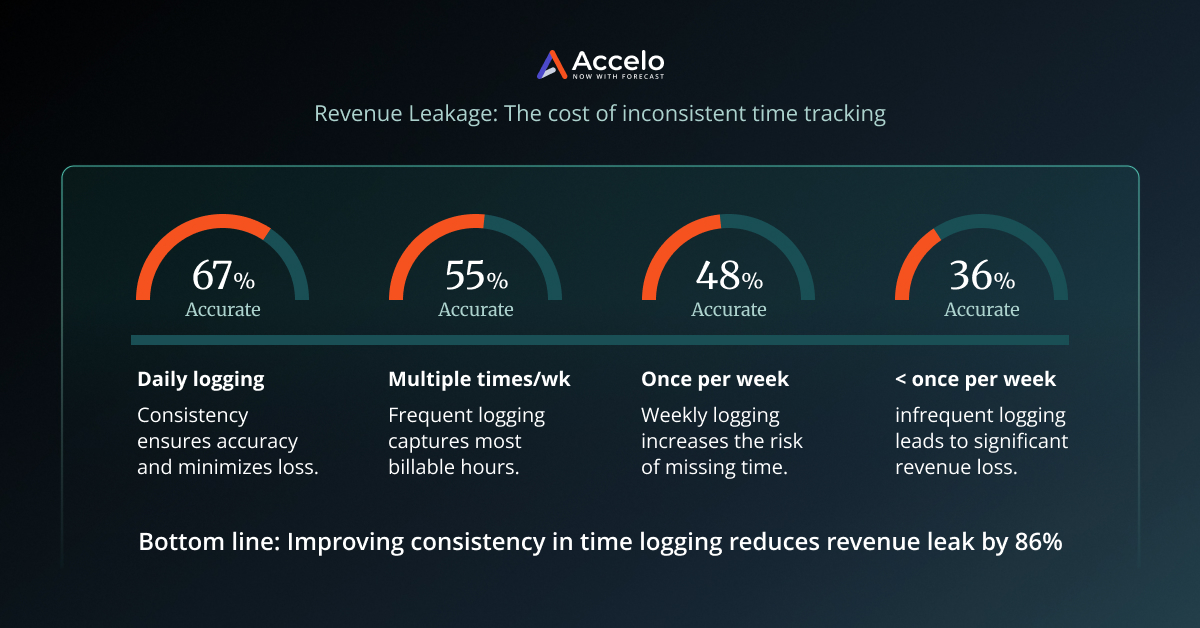
Automated time tracking addresses the root cause structurally. When hours are captured as work occurs rather than reconstructed from memory at the end of the week, logging compliance improves without behavior change. The other leakage vectors — scope, write-downs, rework — are addressed through real-time budget visibility and tighter approval workflows. PSA software solutions, like Accelo, remove the conditions that enable leakage, not just the symptoms.
Taken together, the utilization and leakage scenarios are conservative assumptions, especially given that 42% of professional services companies experience some form of revenue leakage. (source: MGI Research) The question is, how much is your firm not capturing?
How AI Is Changing PSA Software
The conversation around AI in professional services software has changed meaningfully over the last two years. The question is no longer whether AI belongs in a PSA platform; it's whether the AI is genuinely useful or just a feature on a marketing slide.
From operational record-keeping to predictive intelligence
Legacy PSA thinking was largely retrospective: log time, close projects, run reports, review what happened. The shift underway is from reporting on the past to predicting the future — and for professional services firms, that distinction has direct financial consequences.
Consider what changes when a PSA platform can tell you, three weeks into a project, that current delivery velocity puts you at 127% of budget at completion, with enough time to adjust scope, staffing, or client expectations before the overrun becomes a fact.
Predictive AI doesn't just surface that information faster. It changes the conversation about project management entirely.
Native AI vs. bolted-on features
AI that learns your business improves its recommendations over time. It can tell you not just that a project is at risk, but why, and then flag the same pattern the next time it appears. AI can simultaneously advise on resource allocation based on skills, past performance, and current workload. It can detect time-entry gaps before they become billing discrepancies.
This is the difference between AI as a reporting layer and AI as an operational intelligence layer. The practical test is simple: ask vendors whether their AI becomes more accurate as it accumulates your data, or whether it performs the same on Day 1 as on Day 365.
The Accelo AI-Powered PSA Advantage
On the surface, PSA software looks similar in functionality. Where Accelo differs is in how it's built to protect your margins and predict profitability.
Accelo data flows throughout the entire project lifecycle, from delivery to billing, so decisions are made on live data rather than reconciled after the fact.
Implementation is equally deliberate. Accelo's dedicated onboarding team works with you to configure workflows, build project templates, and get complex operational processes running, not just activate your account. Most Accelo customers are up and running in a matter of weeks — not quarters — because the onboarding team is built for this, not assembled on a project-by-project basis. The result is faster adoption and a shorter path to ROI. It's a distinction that shows up in the data: Accelo has consistently been recognized by G2 for having the highest user adoption rate in its category.
AI is another differentiator. Where other PSA platforms layer AI onto existing reporting, Accelo is built on an AI foundation, learning your delivery patterns, refining recommendations over time, and surfacing early warnings before projects drift off track. It also connects with the AI tools your team already uses — Claude, ChatGPT, Gemini, Copilot Studio — through MCP, enabling natural-language queries against live project, resource, and financial data.
The results speak for themselves:
- 40% increase in profitability (Thrive Digital)
- 50% reduction in resourcing time (Spryker)
- 35% increase in utilization (Grafikr)
- $156,000 in overhead eliminated (3 Media Web)
A successful PSA software implementation starts with the right platform, and the right partner to get you there. If you're ready to see what that looks like for your company, start with a consultative discovery call with our team. Book time now.
Frequently Asked Questions
Do we need to clean our data before implementing PSA software?
Yes. A pre-migration data audit pays for itself. Clean data in means clean data out, resulting in faster reporting, cleaner invoices, and fewer discrepancies after go-live. It doesn't need to be exhaustive; it needs to be intentional.
Will implementation disrupt our current operations?
Short answer: less than you'd expect. The first few weeks of configuration happen largely behind the scenes, and your teams aren't affected until training and go-live. Most clients run parallel workflows for a brief period, then switch over. Accelo's onboarding team handles the configuration heavy lifting, so the disruption is front-loaded and short.
How do we get our team to actually use a PSA platform?
Involve end users in configuration before go-live. Build role-specific training around daily workflows, not platform features. Identify internal champions early and give them ownership. And be explicit about what's in it for delivery teams specifically, not just for leadership.
What's the difference between PSA and project management software?
Project management software tracks tasks and timelines. PSA software connects project delivery to resource capacity, time tracking, client billing, and financial performance because, in professional services, how a project is managed directly determines whether it's profitable.



.svg)



.svg)