



A client request lands in your inbox.
Simple enough, until you realize the client has an active project already stretched thin, a retainer running over its hours, or an SLA response time your team is racing to keep. And whoever picks up the request often has none of the context—the delivery history, the prior conversations—that would help them respond well.
For most professional services firms, this is the default. Client requests live apart from the rest of the relationship, parked in a help desk, a shared inbox, or a scattered email thread, and disconnected from the delivery work they're tied to.
The cost isn't obvious until you look for it. Teams must rebuild context before they can act. Managers can't see service work accumulating across clients. And leadership may know what it costs to deliver a project, but miss how much additional effort goes into supporting the same client afterward.
Forecast PSA Tickets is designed to close that gap; see how in this short overview:
Built directly into Accelo Forecast PSA, this ticket management system brings client requests into the same operational environment as projects, retainers, and client delivery. Teams can capture and manage requests, understand what needs attention, keep communication and activity together, and connect service effort back to the engagements consuming it.
The result is a more complete view of client service, including what your team is doing, what you've promised, and what that work is costing the business.
Client Service is Part of Delivery. Treat it That Way.
Traditional ticket management systems are good at organizing support requests.
But professional services teams have a broader problem.
When a client raises an issue, the responding team often needs more than just the request itself. They may need to understand the work already underway, who owns the relationship, whether the request is tied to a client retainer or fixed-fee engagement, what has already been communicated, and how much additional effort the client is consuming.
That context becomes harder to maintain when service requests live in one system and delivery lives in another.
Forecast PSA Tickets brings those workflows closer together. Tickets can be linked to client projects and retainers, while time spent handling requests can be fed into budgets and profitability reporting. That gives support and delivery teams a shared operating picture, rather than forcing them to manage different parts of the same client relationship in separate tools.
It also means ticket management becomes more than a record of what clients asked for; it becomes another source of operational and financial context.
"Almost every professional services firm we talk to is running client support in a tool that has nothing to do with how they deliver client work. That disconnect costs them visibility, time, and ultimately, client trust.” - Joe DiPaulo, CEO, Accelo
From Request to Resolution, Without Losing the Bigger Picture
Forecast PSA Tickets provides teams with a structured way to manage client requests from the moment they are onboarded.
Requests can be created directly in Accelo Forecast PSA or generated automatically from an incoming email. From there, teams can assign ownership, set priorities and statuses, apply labels, and organize work using list or board views. Filters make it easier to isolate the requests that matter most, while the ticket stream keeps client communication and internal collaboration together.
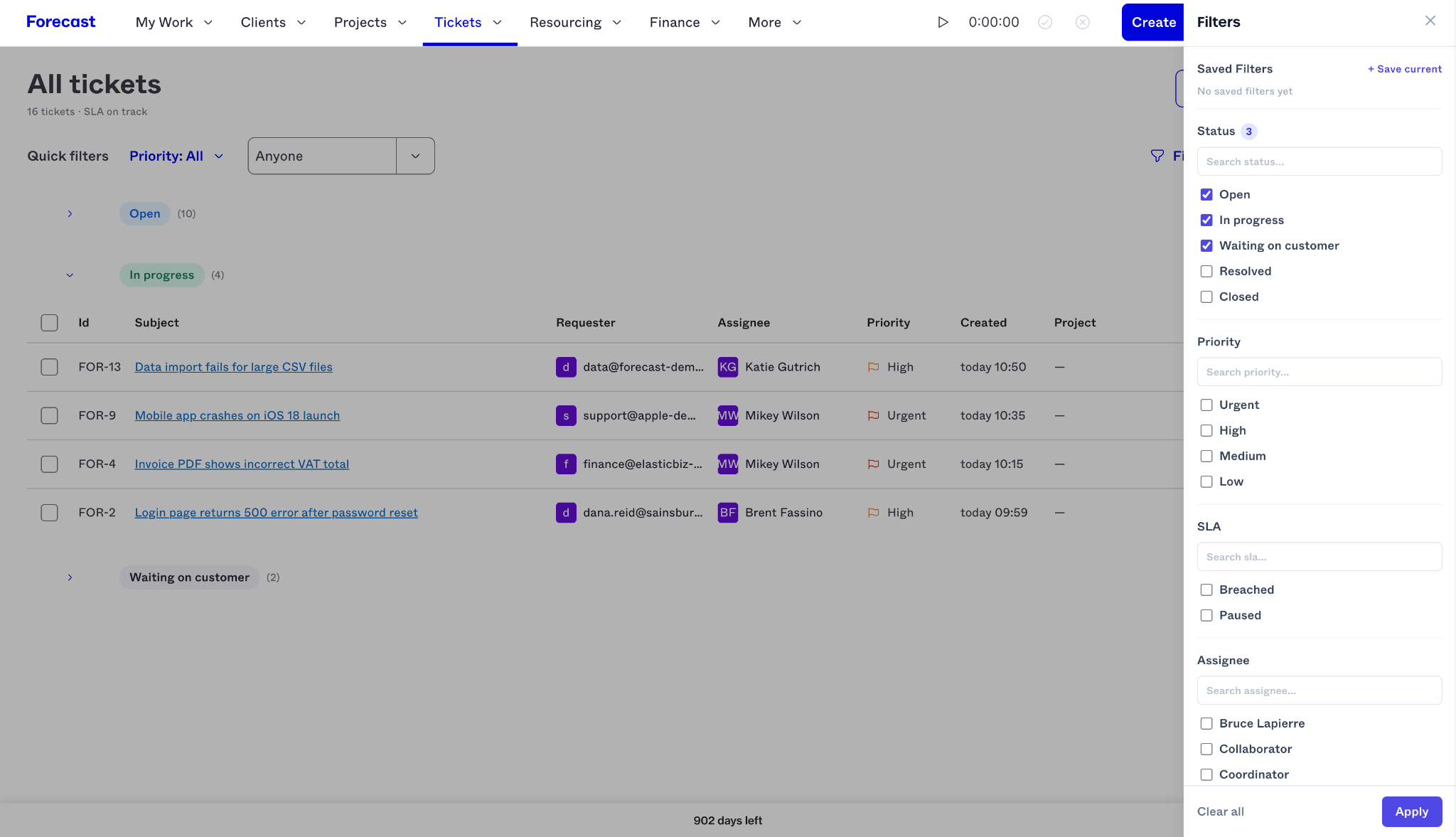
Each ticket also maintains a full activity history, so teams can see how a request has progressed over time rather than piecing the story together from disconnected conversations.
And because understanding a request can take almost as long as resolving it, generative AI helps shorten that first step. AI-generated ticket summaries surface the core issue and current context, while reply drafting gives the person handling the ticket a useful starting point for the next response.
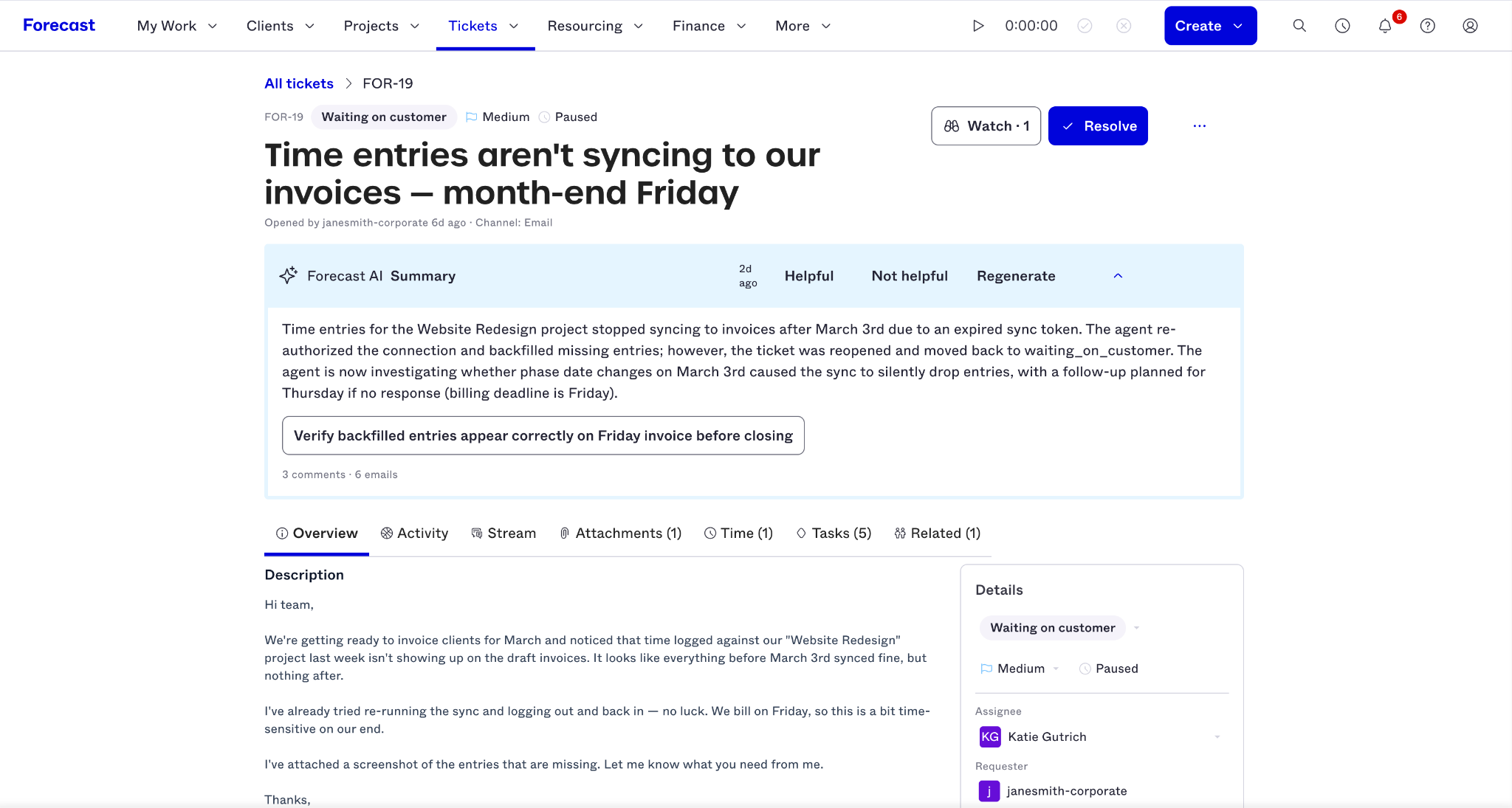
Together, these capabilities provide professional services teams with a ticket management workflow that goes beyond tracking requests.
What Does Ticket Management Look Like in Practice?
The value of a ticket management system becomes clearer in the context of the work professional services teams handle every day. Here are five common scenarios where connecting client requests to the broader delivery picture makes a difference.
1. New client requests: How quickly can your team understand the issue and respond?
A client emails with an issue midway through an active engagement.
Without a structured ticket management workflow, that message can trigger a familiar chain of questions:
- Who should own this?
- Has the client raised the issue before?
- What has already been tried?
- Is there anything we've promised that the person responding needs to know?
Forecast PSA Tickets turns incoming email into a trackable request and keeps the related conversation, attachments, activity, and ownership in one place.
Instead of reading the entire message history to get oriented, the person handling the request can use the AI-generated summary to understand the issue and the current state quickly. From there, AI-assisted reply drafting helps move them from context gathering to an informed response faster.
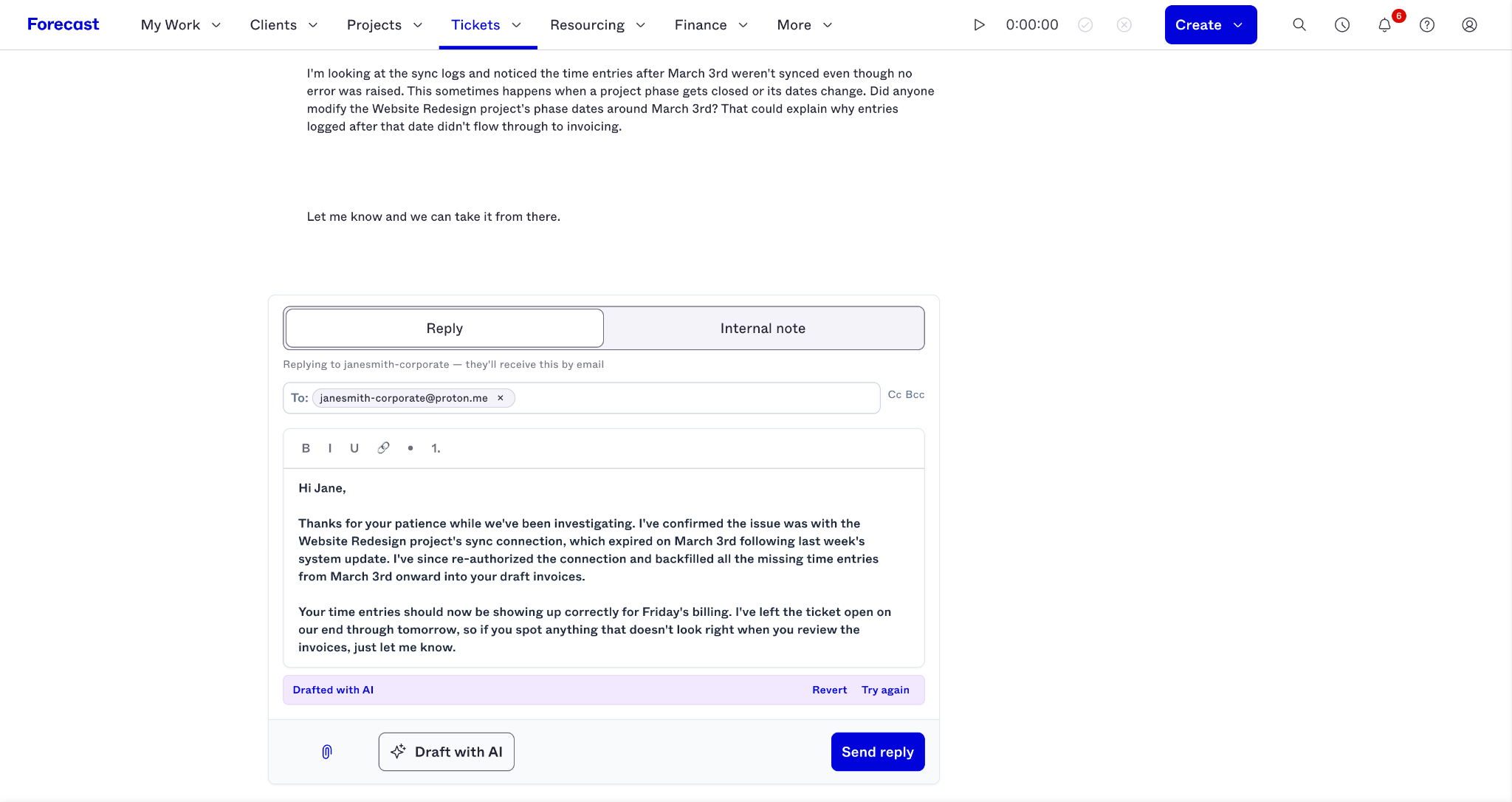
The point is not simply to respond more quickly. It's to respond with enough context that the client doesn't have to explain the same situation again.
2. Ticket prioritization: Which client requests need attention right now?
One ticket is easy to understand. A queue of dozens is different.
A team lead may need to know which requests are still unassigned, which are high priority, which belong to a specific client or team member, and which are approaching a service commitment.
Forecast PSA Tickets gives teams multiple ways to organize that workload. List and board views make it easier to see individual requests or overall flow, while filters and quick-filter options help narrow the queue by criteria such as status, assignment, priority, and labels.
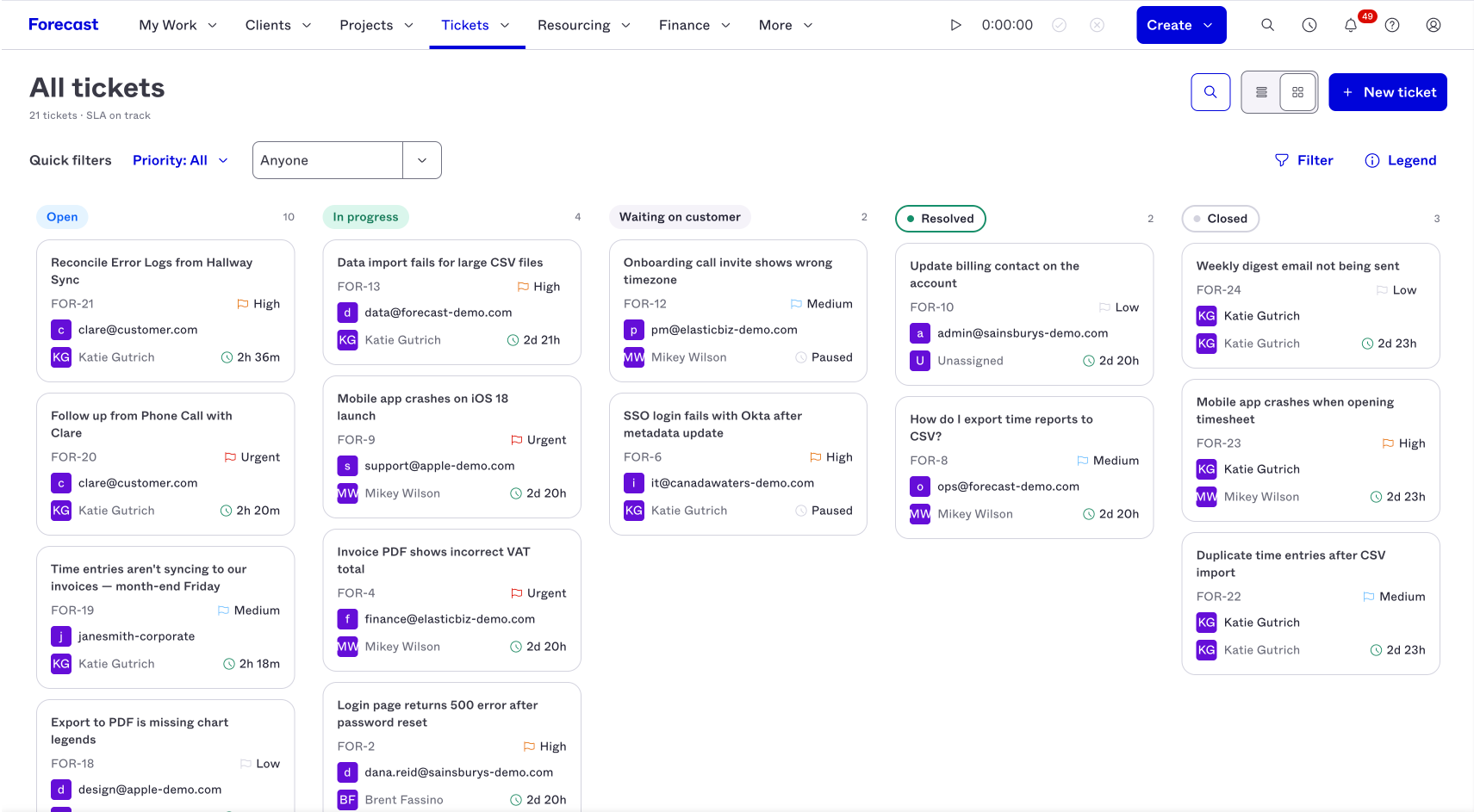
The goal isn't to inspect every ticket. A useful ticket management system should help the team answer a much more important operational question:
What needs intervention now?
Better ticket management isn't about creating a perfectly organized queue. It's about making sure the right work rises to the top before a routine request becomes a client problem.
3. The economics of client support: How is ongoing client service impacting margins?
This is where ticket management becomes especially important for professional services firms.
A project can look profitable on paper while the same client generates hours of follow-up requests after the core delivery work is complete. A retainer can appear healthy until recurring service demands consume more effort than the agreement was priced to support.
When that work sits in a separate ticketing system, the financial impact can remain invisible.
Forecast PSA Tickets connects service requests with the projects and retainers they relate to. Time logged against those requests can count toward budgets and feed into client profitability reporting, giving leaders a more complete picture of what it actually costs to serve an account.
That makes it possible to ask more meaningful questions about service effort:
- Which clients are consuming the most service effort relative to their retainer value?
- Is a fixed-fee engagement still profitable once ongoing client requests are included?
- Are repeated service issues beginning to erode the margin on an otherwise successful account?
Because service activity is connected to the customer relationship, teams can also use MCP to understand how requests are affecting a particular client, retainer, or fixed-fee engagement.
That visibility gives firms a chance to intervene before unnoticed service work turns into margin erosion.
4. Service request handoff: Can the next person pick it up without starting over?
Client service rarely stays neatly with one person.
Someone goes on leave. A technical specialist needs to step in. An account manager gets pulled into an escalation. A team lead takes over a sensitive client conversation.
Each handoff creates the same risk: the next person has to reconstruct what happened before they can make a good decision.
Forecast PSA Tickets keeps the conversation and activity history attached to the request, including client emails, internal discussion, and ticket activity.
The AI summary gives the incoming team member a faster way to understand the issue, while the full audit trail provides the detail they need when the history matters or a complete service record needs to be maintained.
Instead of asking, “Can someone catch me up?”, they can see what the client asked for, how the team responded, what changed along the way, and where the request stands.
That continuity is especially important in professional services, where the quality of a response often depends as much on the relationship context as on the immediate issue.
5. SLAs: Are you meeting the service commitments you've made to clients?
Fast responses are useful. Predictable service is better.
Forecast PSA Tickets includes service level agreement (SLA) management with visual indicators that help teams see how requests are tracking against their service commitments.
That visibility makes it easier to identify a request approaching a threshold while there's still time to act, rather than reviewing a missed SLA after the client has already felt the impact.
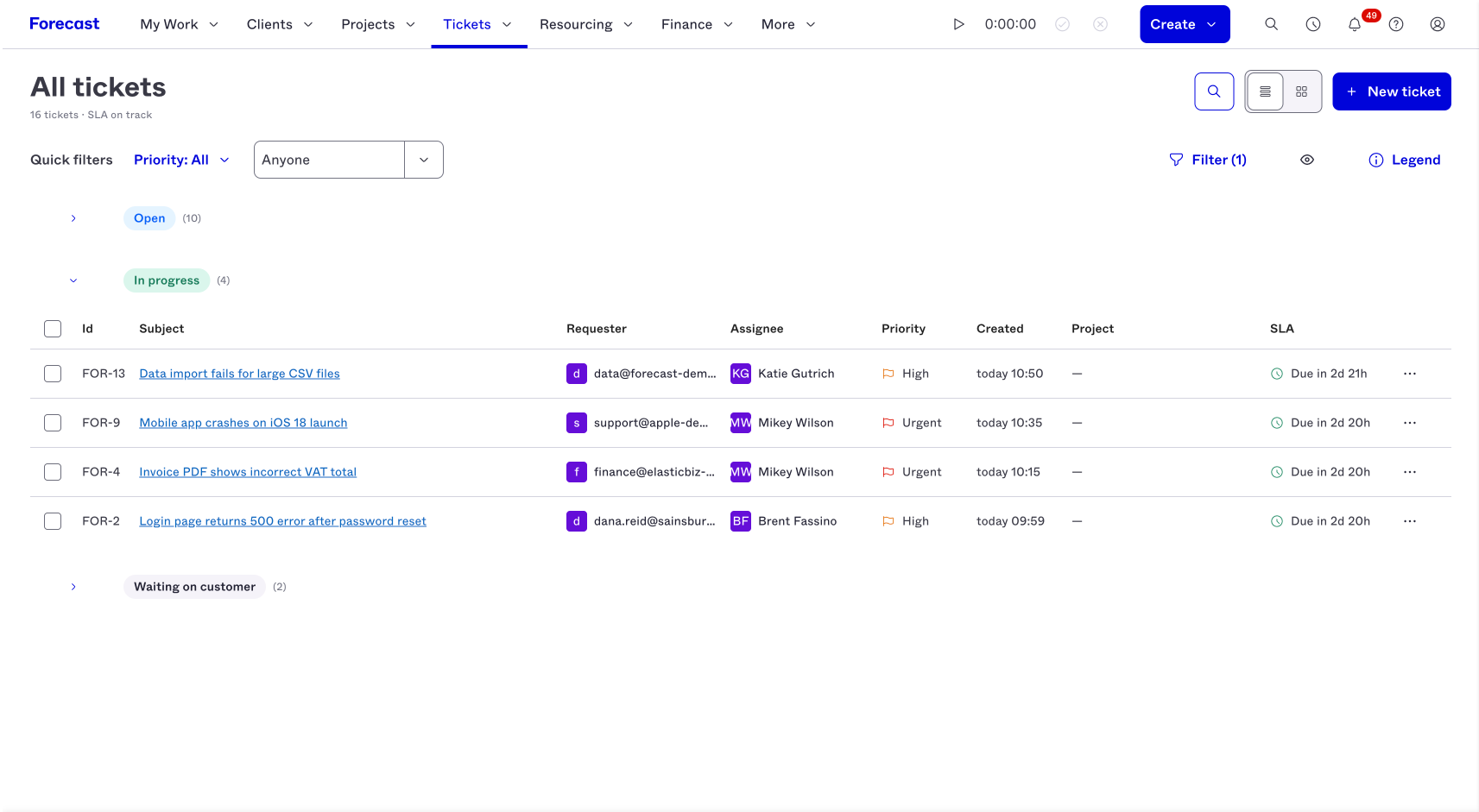
For teams managing ongoing service alongside project delivery, SLA performance isn't just a support metric. It can affect client trust, renewals, account health, and the amount of unplanned effort required to recover from an escalation.
For a deeper look at how to structure, monitor, and improve service commitments, read our guide to SLA management and ticketing.
Using AI to Improve Service Delivery Efficiency
Client service involves plenty of necessary work that doesn't directly solve the client's problem: reviewing history, getting up to speed after a handoff, summarizing what's happened, and drafting the next response.
Forecast PSA Tickets uses generative AI to reduce the overhead of ticket creation, issue summaries, and AI-assisted reply drafting, helping teams move from incoming request to informed action with less manual effort.
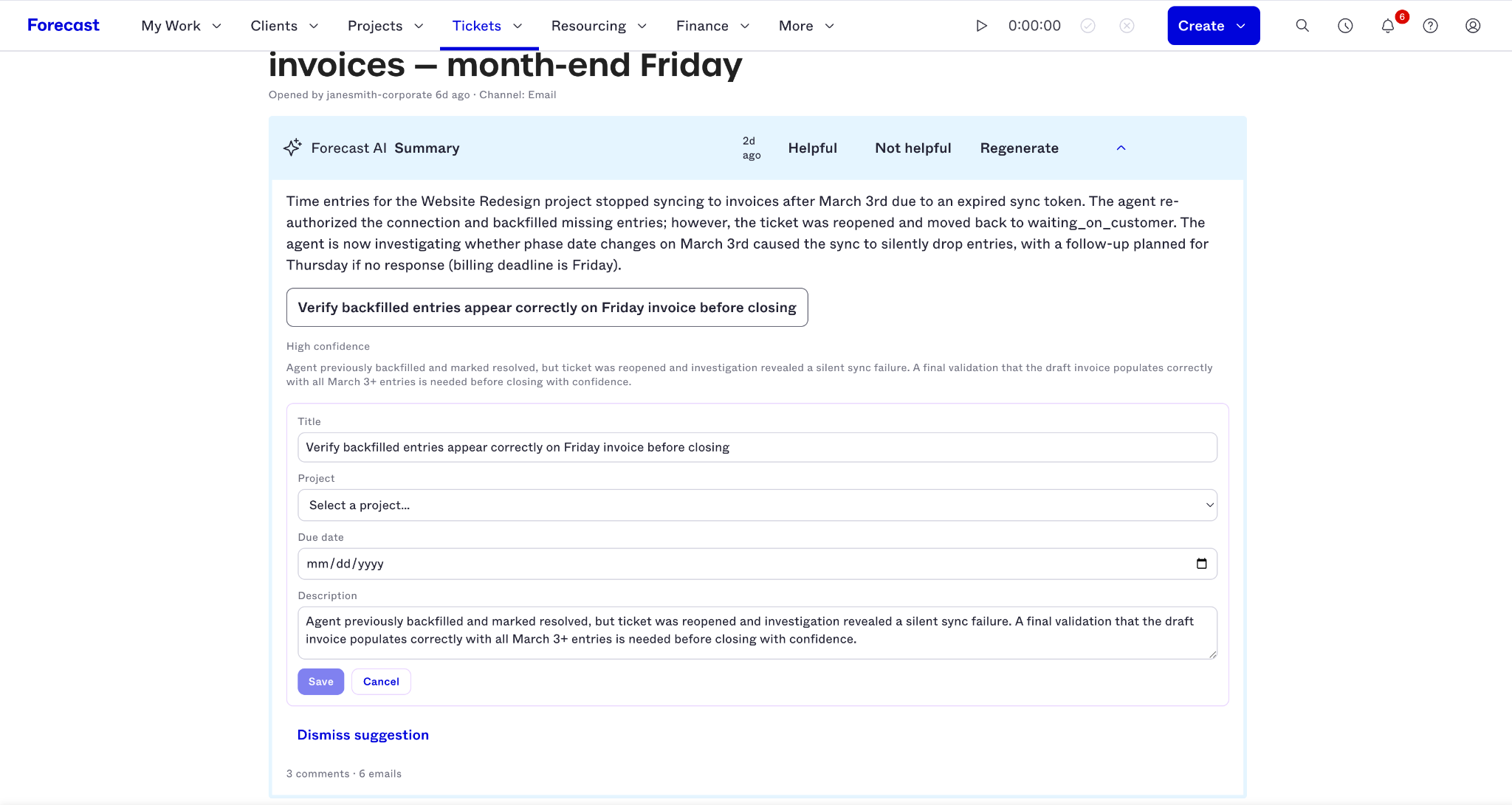
Just as importantly, AI is built into the ticket management workflow itself. Teams can use it in the context of the client request and the work surrounding it, rather than moving information into another tool to get help.
A Ticket Management System Should Show You More Than the Ticket
Most ticket management systems can help teams create, assign, prioritize, and close requests.
For professional services firms, those capabilities solve only part of the problem.
A client request may affect delivery workload. It may consume retainer hours. It may introduce unplanned effort into a fixed-fee engagement. It may signal an account that needs attention. And it may change the profitability of the client relationship even when the underlying project looks healthy.
That's why ticket management becomes more valuable when it's connected to the same system managing the work around it.
Forecast PSA Tickets brings client service into that broader operational and financial picture, giving teams a clearer view of what clients need, what the team is doing about it, and what that work means for the business.
Client service is part of the work you deliver. Now it can be part of the picture you use to manage it, too.
Already an Accelo or Forecast PSA customer?
Contact your account representative to learn how you can add Forecast PSA Tickets and bring client requests, service effort, and delivery data together.
Not using Accelo or Forecast PSA yet?
Book a demo to see how our PSA platforms help professional services firms connect client delivery, resourcing, financial performance, and ongoing service to protect margins and improve performance.



.svg)

.svg)













