



A project can be fully staffed and still lose momentum while your team waits for a client decision. The next phase is scheduled, the deliverable is ready, and the approval is somewhere in an email thread. Your project manager has to chase the response, confirm what was agreed, and update the project before work can advance. Sound familiar?
Across a portfolio, those delays affect more than individual deadlines. They complicate resource planning, add coordination time, and make delivery harder to forecast. Meanwhile, the same PMs are assembling status updates for sponsors who need visibility into the work.
On average, project managers spend 42% of their day on documentation and administrative tasks, stakeholder management, and “herding cats.” - Capterra Strategic Project Management Survey, 2022
Accelo’s Client Workspace gives your team greater visibility into the client decisions and responsibilities that affect delivery. Client Workspace is a branded portal for teams to share deliverables, and clients to review work, complete assigned tasks, and check progress, with their actions recorded in Accelo.
Built for ongoing client collaboration, Client Workspace supports the relationship from kickoff through successive projects and retainer work. For your firm, that means greater control over the dependencies that influence delivery and less time spent coordinating around them. Watch the overview now:
How Better Client Collaboration Improves Delivery Predictability
Delivery leaders need to know which client approvals and tasks are still outstanding and how they affect the schedule. Those commitments should be visible in the project plan, so teams can assess whether work is ready to move forward.
When those commitments are tracked through separate conversations, the delivery forecast relies on individual PMs reconciling what the client has agreed to with what the project plan assumes. That reconciliation becomes harder as engagements expand across teams and phases.
Accelo Client Workspace connects client approvals and task completions to the project record your team manages. That gives your team a documented basis for assessing outstanding commitments and deciding where follow-up or escalation is needed.
4 Ways Client Workspace Strengthens Your Delivery Control
Here’s how Accelo Client Workspace helps your team manage client commitments, reduce coordination overhead, and make more informed delivery decisions throughout an engagement.
1. Move approvals through a defined decision process.
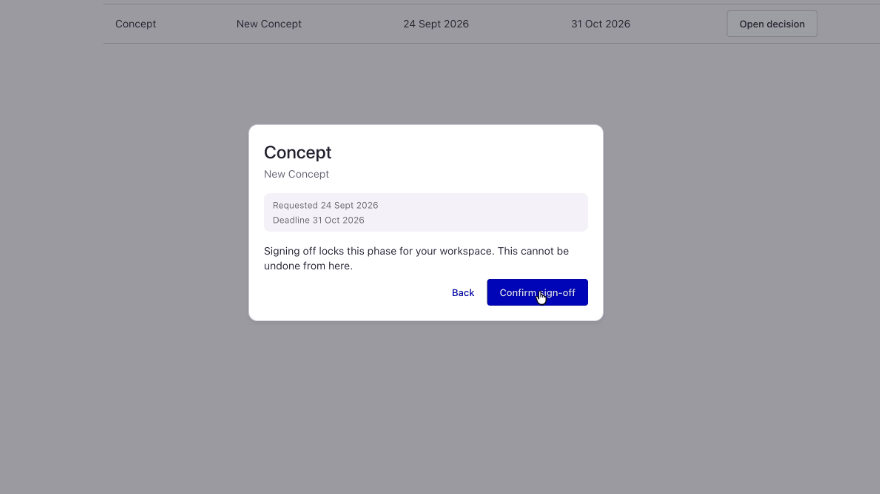
Consider a consulting engagement approaching a phase transition. Your team has provided its recommendations and deliverables, scheduled the next stage, but the client’s approval is still outstanding. Without a clear request and designated approver, feedback can circulate without producing a decision.
In Client Workspace, your team can send materials for review with file previews, comment threads, and deadlines. Approval routing directs the request to the right person at the project, phase, or task level. Clients can approve the work or request changes in the workspace, and Accelo records that response.
For formal phase transitions, milestone sign-offs provide an acceptance record before the next stage begins. A timestamped audit trail preserves the feedback and decision, giving your team a reliable reference if questions arise later.
The operational benefit is a clearer path from completed work to client acceptance. Your PM can distinguish a deliverable awaiting review from one requiring changes, and plan the next step with that context.
2. Give sponsors visibility without rebuilding the project story.
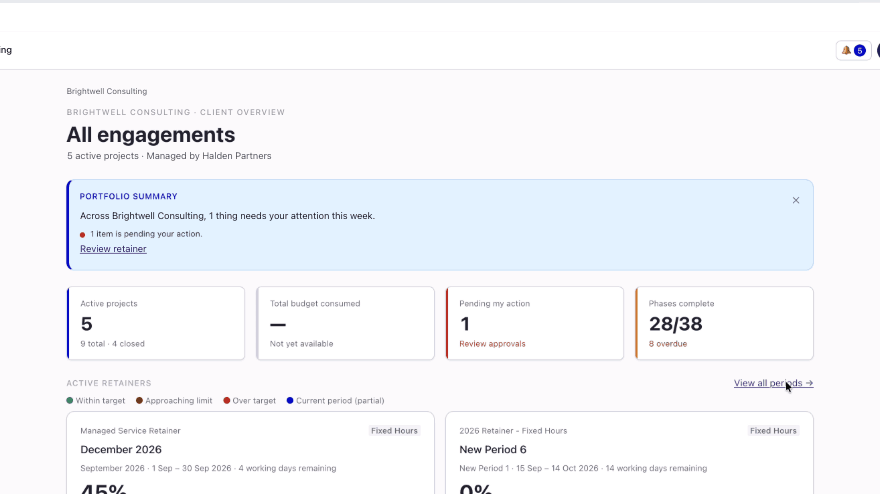
A client sponsor overseeing several initiatives needs a broader picture than a single project update. Preparing that picture manually can pull multiple PMs into assembling reports before each review.
Client Workspace organizes visibility across client, program, and project levels. Your team can give sponsors a view of portfolio health while sharing the relevant detail with project contributors. Status dashboards show current project health, milestones, and due dates. Read-only Gantt views make timelines and dependencies visible.
Because those views draw from the projects managed in Accelo, your team spends less time repackaging information. Sponsors can check progress between meetings, allowing account and delivery reviews to focus on risks, priorities, and decisions that require discussion.
Additionally, your firm controls which projects are published and what clients can access. That lets you provide useful transparency while keeping internal-only information internal.
3. Make client responsibilities visible to the delivery team.
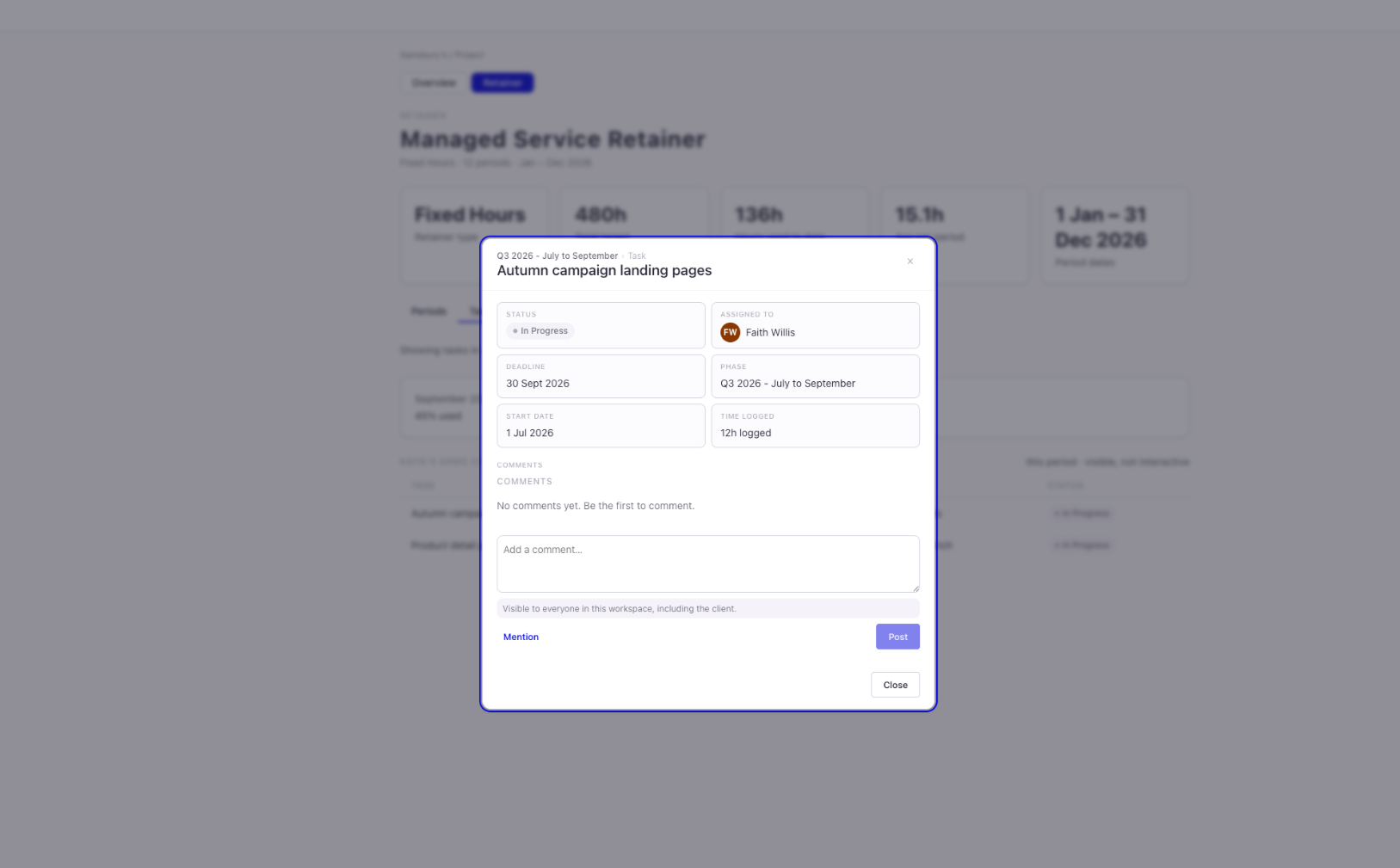
In an implementation engagement, your team may have capacity scheduled for configuration but still be waiting for the client to provide approved source data. If that responsibility is tracked only through email, the PM must keep asking whether it is done and manually reconcile the answer with the delivery plan.
With Client Workspace, your PM can assign project tasks to client contacts with clear ownership and due dates. Clients can mark their assigned tasks complete in the workspace, and Accelo records those updates.
Your team gains a current view of the work the client still owns. PMs can identify outstanding dependencies, assess their impact on the schedule, and direct follow-up to the person responsible. Once the client completes the task, the team has that update without chasing another confirmation.
4. Manage retainer priorities with visibility into hours used.
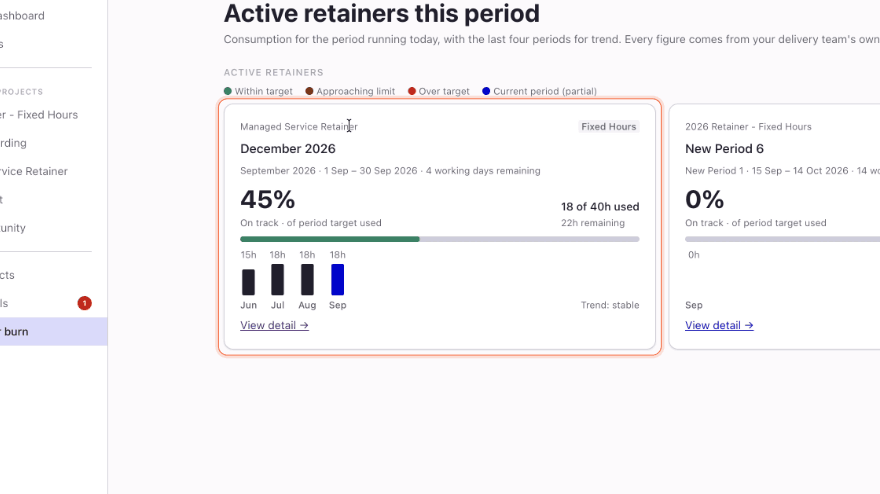
For ongoing service agreements, the conversation often shifts from individual milestones to how the client is using the capacity available in each period. If usage becomes visible only when the invoice arrives, your team has less opportunity to discuss priorities before the budget is consumed.
Client Workspace shows retainer hours used against the period’s budget, along with the burn-rate trend. Clients and your team can reference the same usage information as work progresses.
Account managers can use current usage to discuss remaining retainer hours and upcoming requests with the client. If hours are being used faster than expected, your team can address priorities and adjust the work before the budget is exhausted.
How AI Helps Your Team Address Client Collaboration Risks Earlier
Across active engagements, your team needs to know where attention will make the greatest difference. Accelo combines project performance and client activity to flag stalled approvals, shifts in client sentiment, and emerging delivery risks, helping your team identify where to investigate and when to step in.
For example, an alert about a stalled approval can prompt a PM to review the outstanding decision alongside upcoming milestones. The team can then decide whether to contact the approver, resolve unanswered questions, or adjust the delivery plan.
How Can Your Team Encourage Ongoing Client Collaboration?
Make Client Workspace part of how your team runs the engagement from the start. Your logo, colors, and email sender name create a familiar experience, while secure magic links make access simple. Clients can respond to your team without remembering another password.
Use the first invitation to direct clients to something relevant: an assigned task, a deliverable awaiting review, or a current view of project progress. That gives them an immediate reason to participate and a clear place to return as work continues.
Your team can monitor activation and client activity in Accelo to see whether clients are participating and who may need guidance. Account managers can use that insight to reinforce the workspace’s role in project reviews and upcoming decisions.
As the relationship expands into new projects or ongoing retainer work, clients have a consistent place to stay involved. And your team spends less time assembling updates and chasing responses, leaving more time to lead delivery and manage the relationship.
Already an Accelo customer? Contact your account representative to add Client Workspace to your account.
Not yet an Accelo customer? Book a demo to see how Accelo connects client collaboration with project delivery, giving your team clearer accountability and less follow-up.



.svg)

.svg)













